

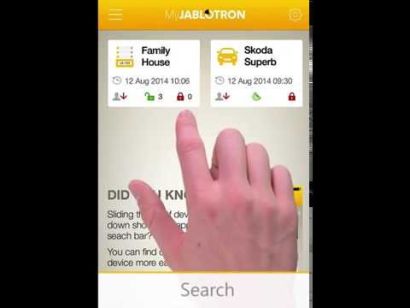
MyJablotron App + Web-Self-Service
MyJablotron App + Web-Self-Service
2
5
5
1
Online-Selfservice MyJablotron: funktionelle MyJablotron-App für Ihr Smartphone. Auch erreichbar über Internetbrowser auf www.myjablotron.com.
Endlose Einstellungsoptionen für Push-Nachrichten, (kostenlose) SMS usw...
Schauen Sie auch auf das PDF-Dokument "Garagentorsteuerung" in Downloads.
Verfügbarkeit: Auf Lager
Artikelnummer
MyJablotron


MyJablotron
Sie können Ihr 100-System mit der MyJablotron-App auf Ihrem Smartphone (Apple oder Android) steuern oder einen Browser verwenden. Besuchen Sie einfach www.myjablotron.com.
Schauen Sie untendrunter für die Verwendungszwecke der MyJablotron-App:
Installation und Gebrauch auf Ihrem Smartphone:
Wie es funktioniert:
Kundenbewertungen
2
Rezensionen
100%
der Kunden
empfehle dieses Produkt
empfehle dieses Produkt
Sortiere nach
Bewertung
Neueste
Hilfsbereitschaft
always on
17 Feb 2016
This is a must have, the team from Credex enabled it just within minutes and I am using this regularly to check the status the logs and the pictures.
And if you have forgotten to set your alarm system, just switch to the app and set it - never again, I have to go back to set the alarm system - super...
Smart
20 May 2015
This completes the Jablotron 100 system. We are moving towards IoT (Internet of Things) and if a new product like JA-100 is not connected to the cloud and there is no app for it, forget it. The manufacturer will hopefully continue to update the apps/services and this way the smartphone/web/tablet/whatever -interface will always be feeling fresh and cool looking.
This was actually one of the most important features that made me choose Jablotron 100.
Carl
Fragen
Hello, from this application is it possible to enter maintenance mode to, for example, delete a detector that is causing a problem in the system ?
Frage von: JC An 12.04.2024, 17:29
In the app you can put the system in maintenance mode to change a battery, i.e. do some maintenance. Apart from the maintenance mode you can also block a detector. By blocking a detector the device will not trigger an alarm but the tamper contacts and faults are still monitored.
Regards
Regards
Antwort von: Frank Ligthart (Admin) An 13.04.2024, 11:16

Diese Artikel könnten Ihnen eventuell auch gefallen!

Verwandte Produkte